
Introduction
In 2026, the concept of "being offline" no longer exists. Our finances, healthcare, social lives, and careers are entirely intertwined with the web. Because our digital footprints have become so massive, the threat landscape has evolved. We are no longer just dealing with annoying pop-up ads; we are facing AI-driven phishing attacks, massive corporate data breaches, and a multi-billion dollar data broker industry that monetizes our every click.
Many people feel overwhelmed by these threats. They assume that achieving true digital privacy requires a degree in computer science or living completely off the grid.
This is a myth. Digital privacy is not a talent; it is a routine. It is a series of simple, highly effective habits and tools that, when combined, create an impenetrable fortress around your identity.
To help you reclaim your privacy and secure your data, we have compiled The Ultimate Digital Privacy Checklist for 2026. By implementing these four phases, you will transition from a vulnerable target to a digital ghost.
Phase 1: Securing the Perimeter (Authentication)
The foundation of your privacy is how you prove you are you. If your authentication methods are weak, all other privacy tools are useless.
1. Ditch the Brain, Use a Password Manager
Human beings are terrible at creating and remembering passwords. If you use Summer2026! for five different websites, you are essentially leaving your front door wide open.
-
The Action: Download a reputable Zero-Knowledge Password Manager (like Bitwarden or 1Password). Generate a random, 20-character password (e.g.,
x&9Pq2!vL$mN8b*1zC@w) for every single account you own. You only need to remember one Master Password.
2. Upgrade Your 2FA (Stop Using SMS)
Two-Factor Authentication (2FA) is mandatory, but receiving your codes via SMS text message is no longer safe due to "SIM Swapping" attacks.
-
The Action: Move all your important accounts (Banking, Primary Email, Crypto) to an Authenticator App (like Aegis, Raivo, or Google Authenticator) or use a physical hardware security key like a YubiKey.
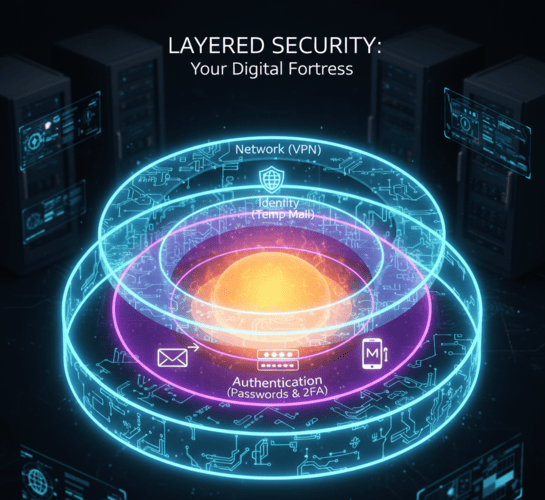
Phase 2: Network & Device Privacy (The Cloak)
Once your accounts are locked down, you must obscure how your device communicates with the internet to prevent location tracking and browser fingerprinting.
3. Use a No-Log VPN
Your Internet Service Provider (ISP) and the websites you visit can see your exact IP address, revealing your physical location.
-
The Action: Always use a reputable, paid Virtual Private Network (VPN) that has a strict "No-Logs" policy audited by a third party. This routes your traffic through an encrypted tunnel. It is absolutely mandatory when using public Wi-Fi at airports or cafes.
4. Harden Your Web Browser
Mainstream browsers are designed to track you. They allow third-party cookies and trackers to follow you from site to site.
-
The Action: Switch to a privacy-first browser like Brave, Firefox (with strict tracking protection enabled), or Tor for extreme anonymity. Install a trusted ad-blocker like uBlock Origin to stop malicious scripts from loading on your screen.
Phase 3: Identity Compartmentalization (The Shield)
This is the phase where most users fail. You can have the best VPN and the strongest passwords in the world, but if you voluntarily type your primary email address into a web form, you have just handed over your identity.
5. Adopt the "Burner Email" Strategy
Your primary email is your Universal Digital ID. Giving it to an e-commerce store for a 10% discount is like handing a stranger your Social Security Number for a coupon.
-
The Action: Make TempMailM your default gateway to the internet. Keep a tab open whenever you browse. If a website asks for an email to read an article, download a PDF, join a forum, or access Wi-Fi, generate a disposable email address. The temporary inbox catches the spam and the tracking pixels, then self-destructs. Your real identity remains completely hidden from data brokers.
6. Use Virtual Credit Cards
Just as you shouldn't share your real email, you shouldn't share your real debit card number with random online merchants.
-
The Action: Use services like Privacy.com or Revolut to generate single-use, virtual credit card numbers. If the merchant gets hacked, the card they steal is useless. It also guarantees that "Free Trials" actually end when you want them to, as the virtual card will simply decline unauthorized auto-renewals.

Phase 4: The Digital Audit (Reducing the Attack Surface)
Privacy is not a set-it-and-forget-it task. You must periodically clean up the digital mess you left behind over the past decade.
7. Delete Old, Unused Accounts
Do you still have a MySpace account? A Tumblr from 2012? An account on a gaming forum you haven't visited in eight years? These "Zombie Accounts" are massive security risks. They often use old passwords and are the first to get hacked.
-
The Action: Search your primary inbox for the word "Welcome" to find old accounts. Log in, request account deletion, and close them permanently.
8. Review App Permissions
Your smartphone is a goldmine of data. Does that free calculator app really need access to your microphone and GPS location? Absolutely not.
-
The Action: Go into your phone settings. Revoke Location, Microphone, Camera, and Contact access for any app that doesn't strictly need it to function.
Conclusion: Reclaim Your Digital Sovereignty
Total digital privacy in 2026 is an ambitious goal, but it is entirely achievable.
Big Tech companies, advertisers, and cybercriminals rely on one thing: Your convenience. They bet that you will be too lazy to use a password manager, too hurried to turn on a VPN, and too eager for a discount to use a disposable email.
Prove them wrong. By treating your digital identity with the respect it deserves, you take back control. Follow this checklist, use TempMailM to isolate your daily web interactions, and navigate the internet with the peace of mind that comes from knowing you are truly secure. The web is yours to explore leave no trace behind.