
Introduction
In the early days of the internet, having one email address was enough. You used it for everything: writing to friends, signing up for forums, buying books, and applying for jobs.
But the internet has changed. Today, it is a data-hungry machine. Every website, app, and Wi-Fi hotspot demands your email address. If you hand over your primary address (like your personal Gmail or Outlook) to everyone who asks, you are inviting chaos into your digital home.
This brings us to a modern dilemma: Should you use your real email or a temporary one?
Some users are purists who use their real email for everything and drown in spam. Others are privacy extremists who use fake emails everywhere and get locked out of important accounts. The secret to a healthy digital life lies in the middle.
In this guide, we will compare Real Mail vs. Temp Mail head-to-head, helping you decide exactly which tool to use for every online scenario.
The Contenders: Defining the Difference
Before we decide when to use them, let’s clarify what they are.
1. Real Mail (Permanent Email)
-
Examples: Gmail, Yahoo, Outlook, iCloud, ProtonMail.
-
Lifespan: Forever (or until you delete it).
-
Key Feature: It is your digital identity. It stores history, contacts, and allows two-way communication (sending and receiving). It requires a password and often a phone number to create.
2. Temp Mail (Disposable Email)
-
Examples: TempMailM, 10MinuteMail, Guerilla Mail.
-
Lifespan: Short-term (Minutes to hours).
-
Key Feature: It is a burner address. It requires no password, no registration, and no personal details. It is designed to receive incoming mail for a short session and then self-destruct.
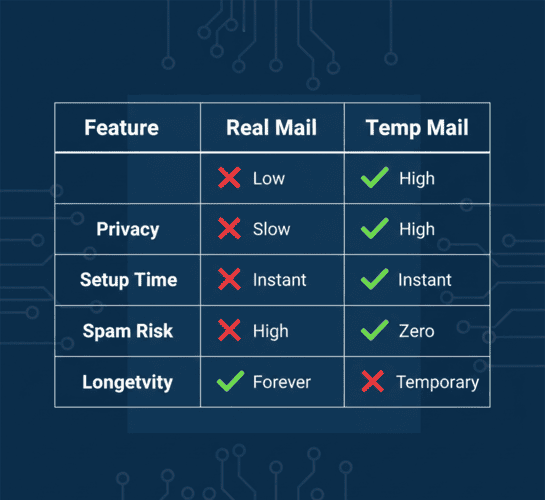
Head-to-Head Comparison
Let's break down the differences based on the metrics that matter most to users.
Round 1: Setup Speed
-
Real Mail: Creating a new Gmail account takes 2-5 minutes. You need to pick a unique username, create a strong password, and usually verify a phone number.
-
Temp Mail: Instant. You open TempMailM.com and the address is already there waiting for you.
-
Winner: Temp Mail (By a mile).
Round 2: Security & Privacy
-
Real Mail: Secure against hackers (if you use a strong password), but terrible for privacy. Your activity is tracked across the web to build an ad profile.
-
Temp Mail: Excellent for privacy. Since it’s not linked to you, it breaks the tracking chain. However, it lacks password protection, so it's session-based security.
-
Winner: Temp Mail (For privacy against tracking).
Round 3: Longevity & Reliability
-
Real Mail: Your emails will be there 10 years from now. Essential for keeping receipts or photos.
-
Temp Mail: Once the browser is closed or the timer runs out, the data is wiped.
-
Winner: Real Mail (For storage).
The Decision Matrix: When to Use Which?
This is the most important part of the guide. Use this "White List vs. Black List" strategy to organize your life.
✅ The White List: WHEN TO USE REAL MAIL
You should ALWAYS use your permanent address for services that require trust, identity verification, or long-term access.
-
Banking & Finance: PayPal, Crypto Exchanges, Bank Accounts. (You need to receive OTPs and reset passwords years later).
-
Government & Medical: Taxes, Healthcare portals, Legal documents.
-
Job Applications: LinkedIn, Resume contact info. (You want employers to find you!).
-
Paid Subscriptions: Netflix, Spotify, Amazon Prime. (You don't want to lose access to something you pay for).
-
Personal Communication: Friends, Family, Colleagues.
⛔ The Black List: WHEN TO USE TEMP MAIL
You should ALWAYS use a disposable address for low-value, high-risk, or temporary interactions.
-
One-Time Downloads: "Enter your email to download this PDF/E-book/Software."
-
Public Wi-Fi: Airport or Cafe login portals. (They sell your data).
-
Beta Testing: Trying out a new app or website you aren't sure about.
-
Comparison Shopping: To see a price or get a coupon code without subscribing to a newsletter.
-
Forums & Comment Sections: Reddit alternatives, crypto forums, or gaming boards where you want to remain anonymous.
-
Voting & Polls: Online petitions or contests that require email verification.

The Hybrid Approach: A Smarter Digital Life
The savvy internet user doesn't choose between them; they use both strategically.
Here is the ultimate workflow:
-
Keep your Real Email guarded like a fortress. Give it only to entities you trust with your money or life.
-
Keep a TempMailM tab open whenever you are surfing the web.
-
When a prompt asks for an email, pause for one second. Ask yourself: "Do I need to hear from this website next week?"
-
If the answer is NO: Use Temp Mail.
-
If the answer is YES: Use Real Mail.
-
Conclusion
Real Mail is for your life. Temp Mail is for the internet.
By understanding the strengths and weaknesses of each, you can stop spam from ever reaching your phone notifications. You protect your identity from data breaches. You browse freely without the fear of "subscription commitment."
Don't treat every website like a trusted friend. Use TempMailM for the strangers, and save your real address for the ones who matter.