
Introduction
Data privacy is finally going mainstream. For years, cybersecurity experts were the only ones warning people about the dangers of handing out their primary email addresses. Today, even Big Tech companies have realized that users are tired of spam and tracking.
In response, tech giants have rolled out built-in features to help you manage your inbox. Google popularized the "Gmail Alias" (+ trick), and Apple made waves with its "Hide My Email" feature built into iCloud.
At first glance, these tools seem to solve the problem. They allow you to create different email addresses on the fly. Because of this, many users wonder: "If my phone or email provider already does this, do I still need a disposable email service like TempMailM?"
The answer is a resounding Yes.
While Apple and Google’s tools are excellent for organizing your life, they fall short of providing true, untraceable anonymity. In this ultimate comparison guide, we will break down how each tool works, expose their hidden flaws, and explain exactly when to use which.
1. Gmail Aliases (The "+" Trick): The Organizer
Let’s start with the oldest trick in the book. If you have a Gmail account, you actually have infinite email addresses.
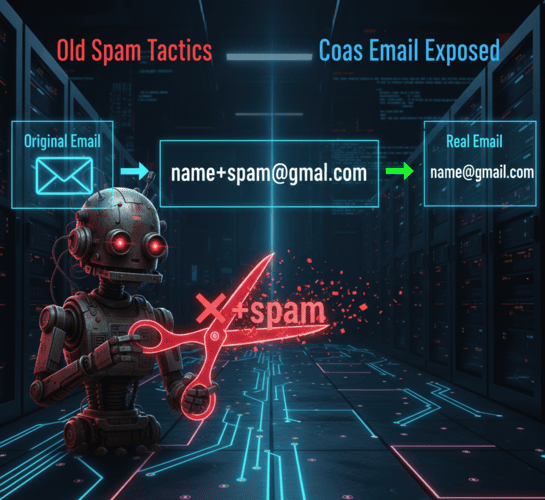
How it works: You can add a plus sign (+) and any word after your username, and the email will still go to your primary inbox.
-
Real Email:
[email protected] -
Alias:
[email protected]
The Pros: It is fantastic for inbox organization. You can set up a filter in Gmail that says: "Send all emails addressed to +shopping directly to the Promotions folder." It helps you see which website sold your data (if you start getting spam to +shopping, you know who to blame).
The Cons (Why it fails at privacy): It provides zero actual privacy. Spammers and data brokers are not stupid. They use automated scripts that look for the + sign and simply delete everything between the + and the @. In one millisecond, they convert [email protected] back to your real, core identity: [email protected]. Furthermore, all the spam still lands in your Google account, taking up your storage space.
2. Apple "Hide My Email": The Premium Forwarder
Apple introduced "Hide My Email" as part of its iCloud+ subscription, and it is a massive step up from Google's method.
How it works: When you sign up for an app on your iPhone or Mac, Apple generates a random email address (like [email protected]). When the website sends an email to that address, Apple's servers receive it and forward it to your real personal inbox.
The Pros: It actually hides your real email address from the website. The merchant only sees the random iCloud address. It is incredibly convenient if you live entirely inside the Apple ecosystem.
The Cons (The "Inbox Clutter" Problem): Apple's tool is a forwarding service, not a disposable inbox.
-
The Clutter: Because it forwards to your main inbox, your Apple Mail app will still fill up with the website's daily promotional newsletters. You have to manually go into your iPhone settings, find that specific hidden email, and deactivate it to stop the spam.
-
The Identity Link: You are anonymous to the website, but you are not anonymous to Apple. The hidden email is hardcoded to your Apple ID.
-
The Paywall: To use it everywhere (not just "Sign in with Apple"), you must pay for an iCloud+ subscription.
3. TempMailM: The True "Burner" Identity
This brings us to the disposable email generator. Services like TempMailM are built on a completely different philosophy. They don't forward mail, and they don't link to your identity. They create a parallel, temporary reality.
How it works: You visit the website, and a random address (e.g., [email protected]) is generated instantly. The inbox exists entirely on the web page. When you close the tab, the inbox and its contents are incinerated.
The Pros:
-
Absolute Zero Clutter: Because there is no forwarding, the spam never touches your phone or your real email app. Your primary inbox remains pristine.
-
True Anonymity: You don't create an account to use TempMailM. It is not linked to your Apple ID, your Google account, or your credit card. You are a digital ghost.
-
Universal Access: It works on Windows, Android, Mac, iOS, or a public library computer. No ecosystem restrictions.
The Cons: It cannot be used for permanent accounts. If you use it for your bank account, you will lose access when the temporary inbox self-destructs.
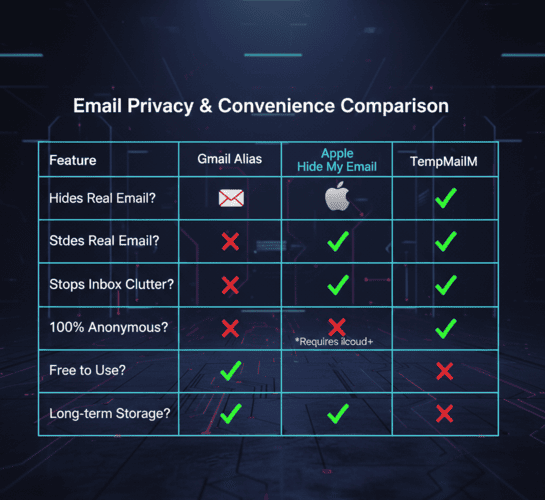
The Decision Matrix: When to Use Which?
Do not view these tools as enemies; view them as different clubs in your golf bag. You use different tools for different shots.
-
Use Gmail Aliases (+) when you are signing up for a trusted service (like your bank or utility company) and just want to organize your incoming mail with filters.
-
Use Apple "Hide My Email" when you are signing up for a service you will use long-term (like a delivery app or a news subscription) but you don't fully trust them not to share your data. You want the emails, but you want to hide your core address.
-
Use TempMailM for the "Wild West" of the internet. Use it for one-time Wi-Fi logins, downloading a single PDF, claiming a 10% discount code, or reading a gated article. Use it when you want the transaction to end immediately and leave absolutely zero trace in your real inbox.
Conclusion: The Shield vs. The Vault
Apple and Google provide tools to help you manage the spam entering your digital home. A disposable email like TempMailM ensures the spam never even finds your address.
While built-in aliases and forwarding services are fantastic upgrades to your privacy hygiene, they do not replace the need for a true "burner" account. Keep your Apple and Google accounts as your secure vaults, and use TempMailM as your frontline shield.