
Introduction
"This message will self-destruct in five seconds." It is the classic line from spy movies. While we don't live in a world of exploding briefcases, the concept of self-destructing information is more relevant today than ever. In the digital age, keeping a permanent record of every minor interaction is a massive security liability.
When you use a disposable email address, you are essentially using a self-destructing digital mailbox. But a common question arises for new users: "Exactly how long does this email last?"
If you are waiting for an important verification code, you want to make sure the inbox doesn't disappear before the code arrives. Conversely, you want to be certain that the inbox does eventually vanish so no one else can read your messages later.
In this comprehensive guide, we will break down the lifecycle of a temporary email address, how services like TempMailM manage expiration, and why this ticking clock is your greatest defense against spam and tracking.
The Core Concept: Why Time is Security
To understand how long they last, we first need to understand why they expire.
Your permanent email (like Gmail or Outlook) is built on a foundation of Retention. The goal is to keep your data forever so you can search for a receipt from 2018.
A temporary email is built on a foundation of Destruction. The goal is to exist just long enough to complete a transaction (like verifying an account or downloading a file) and then vanish completely.
If a temporary email lasted forever, it would eventually suffer the same fate as a permanent email: it would become a massive, cluttered database of spam, vulnerable to data breaches. By enforcing a strict expiration policy, services like TempMailM ensure that:
-
Your Data is Not Hoarded: We minimize the amount of data stored on our servers, which maximizes your privacy.
-
No Unauthorized Access: Once you are done, the door is locked and the room is demolished. No one can walk in after you and read your verification codes.
The Three Types of Lifespans
The exact duration of a throwaway email depends entirely on the architecture of the service you are using. Generally, the industry uses three different models:
1. The Fixed Timer (The "10-Minute" Rule)
Some older services popularized the "10-minute mail" concept. From the moment you load the page, a literal countdown clock starts ticking. When it hits 00:00, the address and all emails are deleted instantly, regardless of what you are doing.
-
The Flaw: If a website’s server is slow and takes 15 minutes to send a verification email, you lose the email and have to start over.
2. The Extended Timer (24-Hour Mail)
Other services offer addresses that last for a full 24 hours or even a few days.
-
The Flaw: While this gives you plenty of time, it leaves your temporary data sitting on a server much longer than necessary, slightly increasing the privacy risk.
3. The Session-Based Model (The Smart Way)
Modern, advanced services like TempMailM use a Session-Based approach. This is the optimal balance between convenience and security.
-
How it works: The email address is tied to your active browser session. As long as you keep the TempMailM tab open and active, the inbox remains alive. You don't have to race against a 10-minute clock.
-
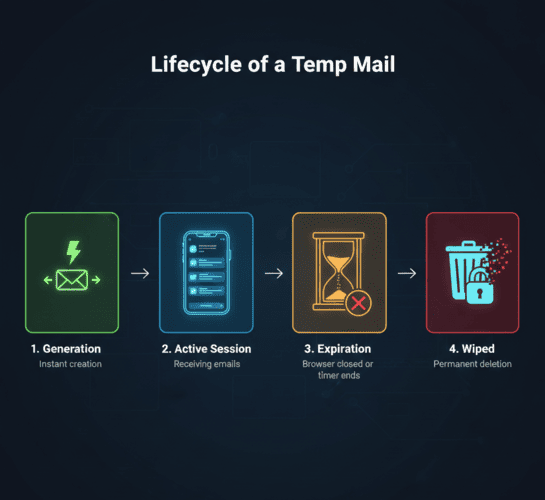
The Expiration Trigger: Once you close the tab, clear your cookies, or generate a new address, the session is terminated. The server recognizes the session is dead and marks the address and its contents for deletion.
What Actually Happens When It Expires? (The Black Hole)
"Deleted" on the internet doesn't always mean deleted. However, in the world of reputable disposable emails, expiration is final.
When your TempMailM session ends:
-
The Address is Retired: The specific combination of letters and numbers (e.g.,
[email protected]) is taken out of the active pool. -
The Contents are Wiped: Automated scripts on the server delete the incoming emails from the database. There is no "Recycle Bin." There is no backup drive. The data is overwritten and destroyed.
-
The Domain Rotation: Periodically, the underlying domain names (the part after the
@) are also changed and retired to prevent websites from blacklisting them.
Frequently Asked Questions About Expiration
Can I recover an expired email? No. This is the most important thing to remember. Once the session is closed, the email is gone forever. This is a deliberate security feature. If we could recover your email a week later, it would mean we were secretly storing your data. We don't.
What if I accidentally close the tab? If you are using a session-based system and you accidentally close the tab, you might be able to restore the session if you immediately reopen your "Recently Closed Tabs" (Ctrl+Shift+T or Cmd+Shift+T), depending on how your browser handles local storage. However, you should never rely on this. Always finish your task before closing the page.
Should I use this for accounts I need next month? Absolutely not. Because the lifespan is so short, disposable emails should never be used for important accounts (like banking, cryptocurrency exchanges, or primary social media profiles). If you forget your password on those sites, the password reset link will be sent to a dead address, locking you out permanently.
Conclusion: Embrace the Impermanence
In a world where algorithms remember what you clicked on five years ago, impermanence is a luxury.
The short lifespan of a temporary email address is not a limitation; it is its greatest strength. It gives you the power to interact with the web, get what you want, and leave without a trace.
Don't worry about the clock. Keep your TempMailM tab open while you need it, verify your account or download your file, and then simply close the window. Let the auto-deletion do the hard work of protecting your privacy.