
Introduction
"URGENT: Your account has been suspended. Click here to verify your identity."
"CONGRATULATIONS: You have won a $500 Amazon Gift Card!"
"INVOICE OVERDUE: Please review the attached PDF immediately."
We have all seen them. They sit in our inboxes, waiting for a moment of weakness or distraction. These are Phishing Emails. They are the most common cyber-attack in the world because they rely on the weakest link in any security system: Humans.
Hackers don't need to write complex code to break into your computer if they can just politely ask you to hand over your password. And surprisingly often, it works.
But what if there was a way to make these attacks irrelevant? What if you could interact with the web without giving scammers a direct line to your digital life? In this guide, we will dissect the anatomy of a phishing attack and show how TempMailM acts as the ultimate shield against social engineering.
The Anatomy of a Phishing Attack
Phishing is a form of social engineering where an attacker masquerades as a trusted entity (like your bank, Netflix, or your boss) to dupe you into opening an email.
Here is the standard lifecycle of an attack:
-
The Lure: The hacker obtains your email address (usually from a data breach or by scraping public forums).
-
The Hook: They send an email designed to trigger an emotion usually Fear (account locked), Greed (free money), or Curiosity (who viewed your profile).
-
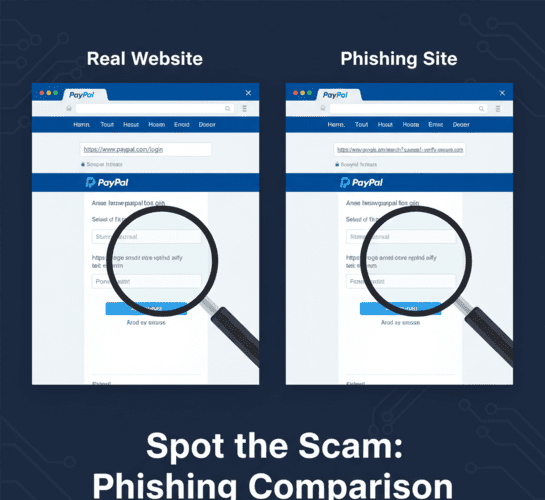
The Catch: You click a link that takes you to a fake website that looks exactly like the real login page.
-
The Sting: You enter your username and password. The fake site records them and redirects you to the real site so you don't suspect anything. The hacker now owns your account.
Why Temp Mail is the "Anti-Phishing" Tool
Phishing relies on one critical factor: You caring about the account.
If you get an email saying "Your Bank of America account is locked," you panic because your money is there. But what if you used a disposable email?
Here is how TempMailM neutralizes the psychology of phishing:
1. No History, No Fear
When you use a disposable email to sign up for a random service, you have no emotional attachment to it. If a phishing email arrives in your TempMailM inbox saying "Your account is suspended!", your reaction isn't panic. It's indifference. You know it's a temporary account. You simply ignore it. The hacker's primary weapon (fear) is useless.
2. Isolation of Threats
When you use your real email for everything, a phishing email from "Netflix" sits right next to a real email from your Mom. This proximity makes it harder to spot the fake. By using temp mail for low-trust sites, you segregate the danger. If an email arrives in your Temp Mail inbox, you know it's likely junk or automated. You treat everything there with suspicion by default.
3. Protecting the "Master Key"
Most phishing attacks aim to steal your primary email credentials (Gmail/Outlook) because that allows them to reset passwords for all your other accounts. By keeping your primary email secret and using TempMailM for the open web, you reduce the surface area of the attack. Hackers can't target an email address they don't know exists.
How to Spot a Phishing Email (A Quick Checklist)
Even with temp mail, you should know how to identify a scam. Look for these red flags:
-
The Sender's Address: Does it say
[email protected]or[email protected]? Always check the actual address, not just the display name. -
Generic Greetings: Legitimate companies usually use your name ("Hi John"). Phishing emails use "Dear Customer" or "Dear Member."
-
Urgency: Phrases like "Immediate Action Required," "24 Hours Left," or "Final Notice" are designed to make you act without thinking.
-
Suspicious Links: Hover your mouse over the button without clicking. Look at the URL preview in the bottom corner of your browser. Does it match the company's real domain?
Conclusion: Don't Take the Bait
Cybercriminals are getting smarter. They are using AI to write perfect English and cloning websites with terrifying accuracy. Relying solely on your ability to "spot" a fake is risky.
The best defense is a good architecture. Structure your digital life so that untrusted entities never get access to your trusted inbox.
Use TempMailM as your frontline defense. Let the phishing emails rot in a temporary inbox that will self-destruct in a few hours. Keep your real inbox safe, clean, and phishing-free.