
Introduction
If you are a software developer or a QA (Quality Assurance) engineer, you know the struggle. You are building a new SaaS platform or an e-commerce site. The deadline is approaching. You need to verify that the "User Registration" flow works perfectly.
So, what do you do?
-
You create
[email protected]. -
Then
[email protected]. -
By the time you reach
[email protected], Google is asking for phone verification, your personal inbox is flooded with "Welcome to [Your App]" emails, and you are wasting valuable coding time just managing test data.
Email testing is a critical part of the development lifecycle, but it is often the most tedious. From validating transactional emails (receipts, invoices) to ensuring password reset tokens work, you need a clean, fresh inbox for every single test case.
This is where Disposable Email Services like TempMailM transform from a privacy tool into a powerful Developer Productivity Tool. In this guide, we will explore how to integrate temp mail into your QA workflow to ship better software, faster.
The Problem with Traditional Testing Methods
Why not just use your personal email or company email?
1. The "Plus" Trick Limitation
Many developers use the Gmail "plus" trick (e.g., [email protected]). While convenient, this has flaws:
-
Validation Rules: Some aggressive regex validators in legacy systems reject the
+character. -
Data Pollution: All those 500 test emails still end up in your primary inbox, clogging your search results and storage.
-
One Inbox Problem: If you are testing a "Chat" feature between User A and User B, having both emails arrive in the same inbox gets confusing fast.
2. The "Mailinator" Public Problem
Public inboxes like Mailinator are great, but anyone can read them. If you are testing a system that sends sensitive data (like API keys or Magic Links) in plain text, using a public, unencrypted inbox is a security risk even in a staging environment.

The Solution: A Clean Slate for Every Test
TempMailM offers a "Sanitized Testing Environment." Here is how it improves your workflow:
1. Infinite Unique Identities
Need to test the "New User Onboarding" flow 20 times to catch a race condition? Just open TempMailM in a new tab (or multiple tabs). Every refresh gives you a completely pristine identity. No history, no cookies, no baggage.
2. Testing "Edge Cases"
-
What happens if a user enters an email with a rare domain?
-
What happens if the email server is slow to respond?
-
Does the HTML email render correctly in a basic web view? TempMailM helps you verify that your application handles external domains correctly, not just the big providers like Gmail or Yahoo.
3. Validating HTML Rendering
Transactional emails (Invoices, Password Resets) are notoriously hard to style. They break in Outlook, they look weird in Dark Mode. By viewing your sent emails in the TempMailM interface, you get a "real-world" look at how your HTML template renders in a standard web view, stripping away the complex caching of major clients.
Use Cases: What Should You Be Testing?
Here is a checklist for your next QA sprint using disposable emails:
-
Sign-Up Flow:
-
Can I register with a valid email?
-
Do I receive the confirmation link instantly?
-
Does the link redirect to the correct "Success" page?
-
-
Password Reset Flow:
-
Request a reset link.
-
Does it arrive?
-
Is the token unique?
-
Does the link expire after use? (Generate a new temp mail to test a second request).
-
-
Newsletter & Marketing:
-
Sign up for the newsletter.
-
Does the "Unsubscribe" link in the footer actually work? (This is a legal requirement!).
-
-
Invite System:
-
User A (TempMail 1) invites User B (TempMail 2).
-
Does User B receive the invite?
-
is the referral code attached correctly?
-
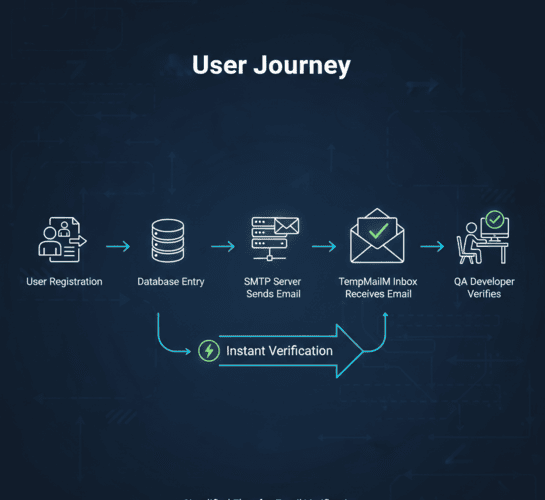
Advanced: Automating the Process
For advanced developers using tools like Selenium, Cypress, or Puppeteer for end-to-end (E2E) testing, manual copy-pasting is too slow.
While TempMailM is primarily a web interface, the underlying logic is consistent. You can write simple scripts to:
-
Launch a headless browser.
-
Navigate to TempMailM.
-
Scrape the
#email-addresselement. -
Input it into your app.
-
Wait for the
#message-listto update. -
Extract the verification URL.
This allows you to run "Smoke Tests" on your production environment without cluttering your real database with internal company emails.
Conclusion: Ship Faster with Cleaner Data
Great software is built on great testing. But testing shouldn't be a chore.
Stop wasting time managing aliases, filters, and phone verifications. Treat email addresses like variables in your code: create them, use them, and dispose of them when the function returns.
TempMailM is the /dev/null of the email world but one that lets you read the message first. Add it to your bookmarks toolbar next to GitHub and StackOverflow. Your future self (and your inbox) will thank you.